 |
Sailing Club of Washington
|
- Home
- Frequently Asked Questions
| Frequently Asked Questions |    |
|
For more information, please email commodore@scow.org. |
| What is SCOW? Do you have a paid staff? | |
|
SCOW is a not-for-profit social club for people in the Washington, D.C. area who love to sail and want to share their love of sailing with others. We've been around since 1966 and have over 300 members, whose sailing skills range from novice to veteran of open-ocean crossings. We have no paid staff. Everything in the club is run by volunteers. |
|
| I don't own a sailboat. Can I still join SCOW? | |
| Most of our members don't own boats. That's one of the main attractions of our club - SCOW owns nine sailboats for use by our members [6 Flying Scots and 3 Catalinas]. Members take a test and pay an annual skipper fee in addition to their membership fee to use our boats. Other than the annual skipper fee, there is no rental charge to use the boats. Many members, however, do own their own sailboats but belong to SCOW because they enjoy our many activities (see our calendar for a list of activities). | |
| How do I become a member? | |
All individuals of 18 years or older are eligible for membership. We welcome sailors with vast experience - or no experience. Joining is simple! Just create a profile including your contact information, read and accept the terms and conditions in the SCOW Membership Agreement, then pay your membership dues, and that's it! What are you waiting for? JOIN NOW!
|
|
| Who can I contact for more information about the club or about joining? | |
| Contact our Membership Director at membership@scow.org. | |
| How can I check the club out in person before I join? | |
| Non-members are welcome to attend our membership meetings. We hold six or more meetings every year. For dates and time please check the calendar on our Home Page. During the summer, non-members are welcome to come by our regular Thursday evening Social Sails to join us for a picnic dinner and a short sail. But, because space is limited in some activities - such as our training classes, our evening sails on the Potomac River, and our Bay events - we only open those events to members. (see Meetings and Events tab). | |
| Can anyone attend the Wednesday evening races and Thursday Social Sails? | |
| The Wednesday evening races are for current SCOW Members only. For more information on becoming a SCOW member, click here. The Thursday Social Sails are open to all. In fact we encourage prospective members to come down the marina, meet the gang, enjoy the boats, and get a feel for the organization. Another great way to find out more about our organization is to attend our monthly meetings, held the second Monday of each month. Check our calendar on our Home Page for the next meeting. | |
| Can any member sail the boats? | |
| To sail our boats, members need to qualify as a skipper. This process includes both a written and water exam. For more information download the guidelines to Becoming a Skipper to help you get started or email the Skipper Director at skipper@scow.org. | |
| Does SCOW offer sailing training? | |
| Yes, but training is offered only to SCOW members (for information on our training program click here). SCOW does not offer training classes to the general public. If you are not a member of SCOW, the Washington Sailing Marina offers classes to the general public. For information on their classes, visit their site Washington Sailing Marina. | |
| Do you rent your sailboats to the public? | |
| No, they are only for use by members of the club. Members of the public can rent sailboats from the Washington Sailing Marina. | |
| How do I get into racing on SCOW boats? | |
| Information about racing on SCOW boats can be found on the Race with SCOW page. Also, feel free to contact SCOW Racing Director at racing@scow.org. Remember that you must be a SCOW Member to race on SCOW boats. |
|
| I sent an email asking for information and I haven't heard back yet? | |
| All our officers are volunteers with families and full-time jobs. Yes, we have tried flogging and keelhauling our volunteers but it hasn't worked. Plus, like everyone, we occasionally suffer from crashing computers and errant emails. So, please be patient and if you think you've waited too long for an answer, send another email or contact our Commodore at commodore@scow.org who will see that your issue is answered. | |
| Are you affiliated with the National Park Service or Guest Services, Incorporated? | |
| The Washington Sailing Marina is part of the George Washington Memorial Parkway, which is administered by the National Park Service. Although we keep our boats at the Marina, SCOW is an independent club and is not affiliated with either the Park Service or GSI. | |
| Can you tell me more about the Washington Sailing Marina? | |
| The Washington Sailing Marina is the premier facility for one-design and small sailboat racing in the DC Metro area. The Washington Sailing Marina is operated by Guest Services, Incorporated, which is the concessionaire selected by the National Park Service to operate the Marina. Home to many one-design fleets, including Hobie, Lightning, Albacore, Flying Scot, Thistle, Mobjack, Penguin, Capri, and others, the Sailing Marina is host to the Potomac River Sailing Association, Daingerfield Island Cruising Fleet, Sailing Club of Washington, Georgetown Sailing Team, and the National Yacht Club. If you own a sailboat and have not yet visited the Sailing Marina, bring it down - and see what you've been missing! | |
| Can you tell me more about the The Chesapeake Bay Yacht Racing Association? | |
| The Chesapeake Bay Yacht Racing Association (CBYRA) is an organization comprised of over 75 member clubs, more than 50 classes of racing sailboats, and over 1800 individual members from Pennsylvania, Delaware, Maryland, Virginia, New Jersey, and North Carolina. CBYRA represents these clubs, classes and individual members to US Sailing. CBYRA is the fourth largest such Association in US Sailing.. | |
| Can you tell me more about the Potomac River Sailing Association? | |
| PRSA was founded over 50 years ago to provide a focal point for small boat sailing on the Potomac. PRSA is a member of the CBYRA. If you are new to the area or new to sailing, there is no better way to meet others with similar interests than through PRSA. | |
| Can you tell me more about the Daingerfield Island Cruising Fleet? | |
| DISC is located in Washington, DC and sails out of the Washington Sailing Marina. The club conducts races every Tuesday Night on the Potomac River, overlooking our Nation's Capital. The club also sponsors several weekend regattas throughout the year including the Frostbite Cup, Kid's Cup Regatta and the Leukemia Cup. Proceeds raised from these races benefit local charities. | |
| What is the International Sailing Federation? | |
| The World Sailing (as it is now called, formerly the International Sailing Federation-ISAF) is officially recognized by the International Olympic Committee as the governing authority for sailing world-wide. As such, the World Sailing is responsible for promotion of the sport internationally, managing sailing at the Olympic Games, developing the International Yacht Racing Rules and Regulations for all sailing competitions and the training of judges, umpires and other administrators, the development of the sport around the world, as well as representing sailors in all matters concerning the sport. | |
| What is US Sailing? | |
| US SAILING is the National Governing Body (NGB) for the sport of sailing and sailboat racing in the United States. Chosen by Congress as the NGB for the sport through the Amateur Sports Act, US SAILING's mission is to encourage participation and promote excellence in sailing and sailboat racing in the United States. A member-based non-profit organization, US SAILING accomplishes its mission through volunteers and member organizations, supported by an administrative staff. For information on offers (Racing Rules of Sailing, visit US SAILING's racing website at US Sailing Racing Rules US SAILING also offers the US SAILING Keelboat Certification System. The system offers seven levels of certification and they range from Basic Keelboat through Offshore Passagemaking. Visit the US SAILING certification website at U.S. Sailing Certification System |
|
| How can I learn more about Knots? | |
|
Knots! Every sailor needs to know them. Here are some sites to help you learn them:
|
|
| What is myCharts? | |
|
myChart is a waterproof, detailed, pocket-sized chart that is perfect for use in the cockpit of a sailboat. Using the SCOW member discount code, distributed via email to members, SCOW members can purchase the myChart for the Potomac River, as well as other charts, and receive a $2.50 discount on every chart they purchase. |
|
| Are there any other sites that might be of interest to sailors? | |
|
If you have a suggestion for a sailing link to be added to our website, please email webmaster@scow.org. All sailing link recommendations must meet the approval of the Board of Directors. |
|
| How do I reset my SCOW password | |||
|
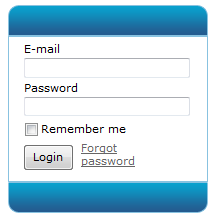
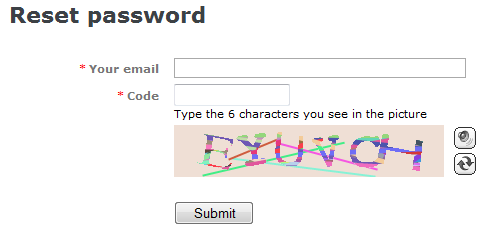
As a SCOW Member, you have access to the Member section the SCOW website. But, you must enter your “E-mail” and “Password” in the bottom block of the Left Hand Navigation. If you forget screen password, click on the "Forgot password" link as shown below on the left image. The system will display a "Reset password" screen (right image below) for you to enter the email address you used to register with SCOW. Enter your email address in the "Your system field and type the 6 characters displayed by the system on the "Code" field and click on the "Submit" button. The system will send your password via email to the email address you used to register with SCOW. If you do not remember the email address you used to register with SCOW, please send an email to the SCOW Membership Coordinator at members@scow.org
|
|||
| How do I edit my SCOW Profile | |
|
When someone becomes a member of SCOW, a Profile record is created along with their membership. Each SCOW Member can use online self-service feature to edit their membership profile details. Here is a link to the instructions. If you have questions, please contatct the SCOW Membership Coordinator at members@scow.org |
|
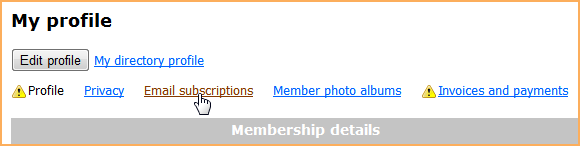
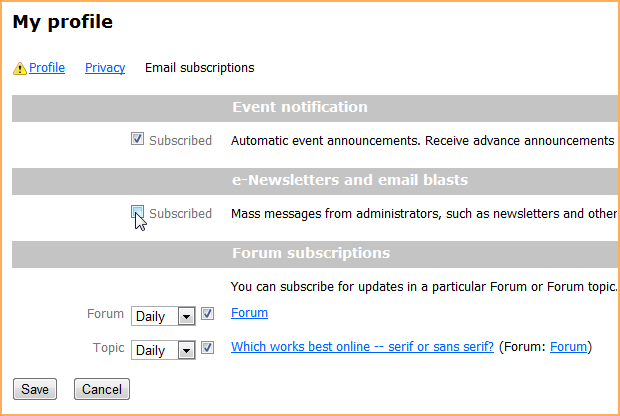
| How do I change my forum subscription settings | |||||||||
|
|||||||||
 Digital Signatures are here!
 SCOW, in its effort to become a little greener, has decided to have members sign all forms digitally on their computers and e-mail signed forms to the appropriate SCOW Director. Digital signatures on the electronic forms requires Adobe Reader DC (free download). You can download a copy for your PC or Mac here: https://helpx.adobe.com/acrobat/kb/install-reader-dc-mac-os.html
Instructions for signing your forms is found here




Sailing Club of Washington [SCOW]
PO Box 25884 • Alexandria • VA • 22313
We keep our boats at Washington Sailing Marina on Daingerfield Island
1 Marina Drive • Alexandria • VA • 22314